 LotsSocial
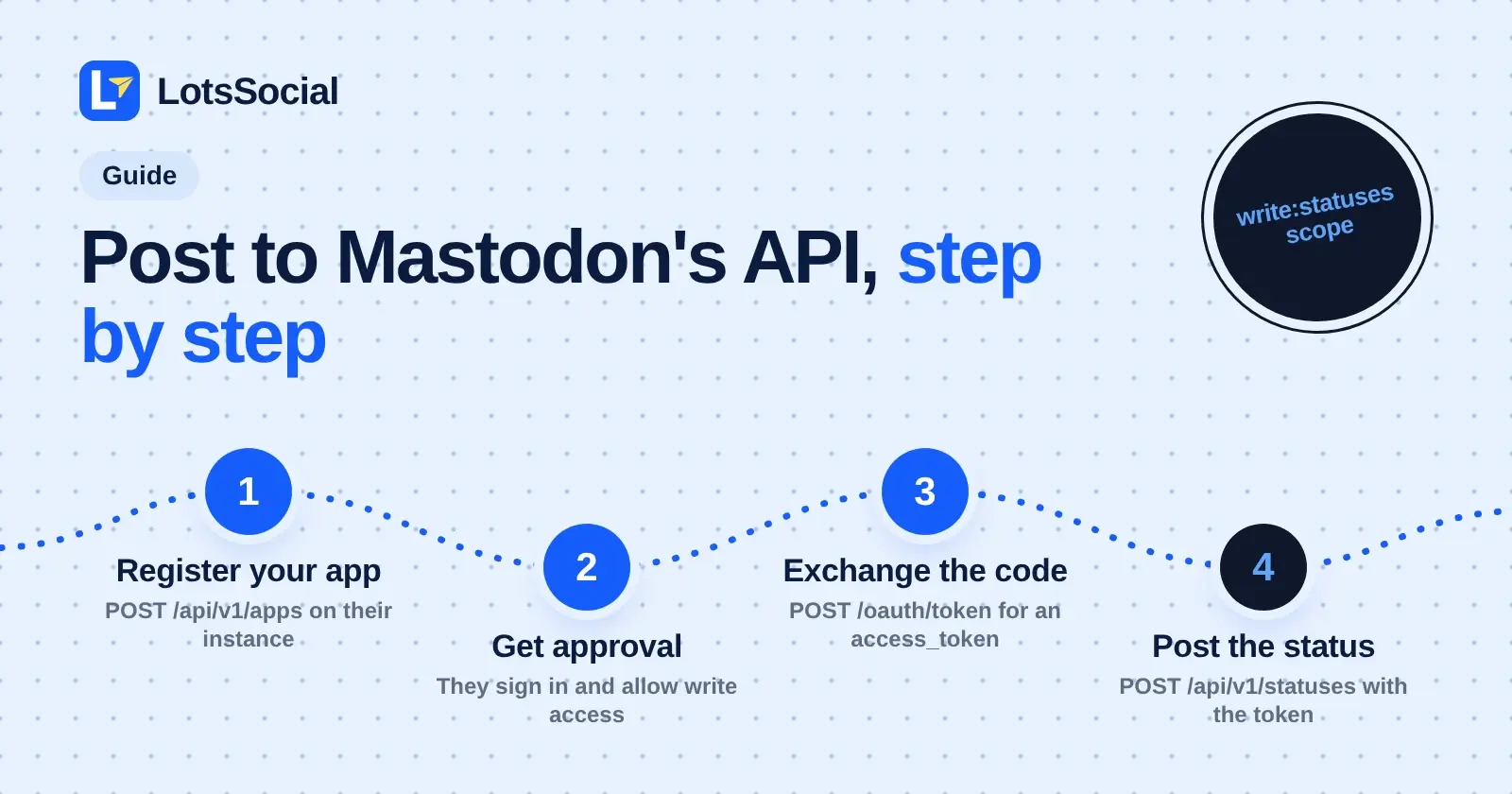
To post a status to Mastodon you call POST /api/v1/statuses on the person's own instance, with an Authorization: Bearer access token that holds the write:statuses scope and a status field with your text. The catch is that Mastodon has no single API: every instance sets its own character limit, media size and app registration, and you register your app separately on each one. I read Mastodon's own developer docs today, 21 November 2026, and I'm the founder of LotsSocial, where Mastodon is one of 11 networks you can connect and post to from an AI agent.
Mastodon API at a glance
| Detail | |
|---|---|
| Post endpoint | POST /api/v1/statuses on the user's own instance |
| Auth | Authorization: Bearer <user token>, scope write:statuses |
| Required field | status (text), unless media_ids is attached |
| Default character limit | 500, but each instance sets its own in GET /api/v2/instance |
| Default media per post | 4 images, or 1 video, gif or audio file, never mixed |
| Default rate limit | 300 requests per 5 minutes, per account and per IP |
| App registration | Per instance; there is no single app that works everywhere |
| Scheduling | scheduled_at on the same endpoint, at least 5 minutes out |
Getting an access token
Mastodon has no central developer portal. Every instance (mastodon.social, fosstodon.org, your own server) issues its own app credentials, so the first step happens on the specific instance your account lives on.
- Register an application. Call
POST /api/v1/appson that instance withclient_name,redirect_urisandscopes. For posting, ask forwrite(or the narrowerwrite:statuseson an instance that supports Mastodon's granular scopes). The response gives you aclient_idandclient_secret; Mastodon's docs say to treat both like passwords. - Send the person to authorize. Open
GET /oauth/authorizein a browser withclient_id,redirect_uri,response_type=codeand yourscope. They sign in on their own instance and approve your app, never you. - Exchange the code for a token. Your redirect handler gets a
codeparameter. Send it toPOST /oauth/tokenwithgrant_type=authorization_code,client_id,client_secret,redirect_uriandcode. The response'saccess_tokenis scoped to that one person, for the scopes they approved. - Confirm it works. Call
GET /api/v1/accounts/verify_credentialswith the Bearer header. A 200 means you're ready to post as that account.
That token is tied to one instance. Connect the same person's account on a second instance (unlikely, but it happens with test accounts) and you register a separate app and get a separate token there too.
Posting a status
With a token in hand, posting is one call:
POST /api/v1/statuses HTTP/1.1
Host: mastodon.social
Authorization: Bearer <access_token>
Content-Type: application/json

{
  "status": "Posted through the API.",
  "visibility": "public"
}
A successful post answers 200 with the new status, including its id and created_at. A blank status with no media answers 422 with "Validation failed: Text can't be blank"; an invalid or expired token answers 401.
Fields worth knowing beyond status:
media_ids(array): attachment IDs from a priorPOST /api/v1/mediaupload.statusbecomes optional once you attach media.visibility:public,unlisted,privateordirect.spoiler_textandsensitive: a content warning shown before the post, with the body collapsed until the reader taps through.in_reply_to_id: makes the status a reply in a thread.language: an ISO 639-1 code.scheduled_at: a datetime at least 5 minutes out. The endpoint then returns a ScheduledStatus instead of a Status, and Mastodon posts it for you at that time.poll[options][]andpoll[expires_in]: adds a poll; a status with a poll can't also carrymedia_ids.- An optional
Idempotency-Keyheader stops the same request from creating two posts if you retry it; Mastodon holds it for up to an hour.
Limits that apply
Mastodon is open source and self-hosted, so Mastodon's own docs describe an instance's configuration as a default, not a fixed rule. You read the real numbers for a given account from that instance's GET /api/v2/instance.
| Setting | mastodon.social's own default | Where it comes from |
|---|---|---|
| Characters per post | 500 | configuration.statuses.max_characters |
| Media attachments per post | 4 | configuration.statuses.max_media_attachments |
| Characters a link counts as | 23, however long the real URL is | configuration.statuses.characters_reserved_per_url |
| Image file size | 16,777,216 bytes (16 MB) | configuration.media_attachments.image_size_limit |
| Video file size | 103,809,024 bytes (about 99 MB) | configuration.media_attachments.video_size_limit |
| Alt text length | 1,500 characters | configuration.media_attachments.description_limit |
| Supported image types | JPEG, PNG, GIF, HEIC, HEIF, WebP, AVIF | configuration.media_attachments.supported_mime_types |
| Supported video types | MP4, WebM, QuickTime (MOV), Ogg, ASF | configuration.media_attachments.supported_mime_types |
Rate limits are documented separately and apply across endpoints, not just posting:
- 300 requests per 5 minutes, counted per account and per IP. Posting a status counts against this; the rate limit docs list no separate, lower limit just for
POST /api/v1/statuses. - Media uploads: 30 per 30 minutes, per account.
- Deleting a status: 30 per 30 minutes, per account.
- Account creation: 5 per 30 minutes, per IP.
- Every response carries
X-RateLimit-Limit,X-RateLimit-RemainingandX-RateLimit-Resetheaders, so you can back off before you hit a 429 rather than after.
Because every instance can change these numbers, an agent that posts to Mastodon on someone's behalf should read GET /api/v2/instance for that account at least once, rather than hard coding mastodon.social's defaults.
What an agent needs to post to Mastodon
Put together, an agent posting to Mastodon on its own needs: the person's instance domain, an app registered on that specific instance, a user-authorized access token with posting scope, that instance's own character and media limits (since they're not fixed), and a way to watch for 429s using the rate limit headers. None of that is hard, but it's per instance, which is the one step that trips people up coming from a single-vendor API.
This is exactly what I built LotsSocial to take off your plate. Mastodon is one of the 11 networks it connects, alongside X, LinkedIn, Instagram, Facebook, Threads, YouTube, TikTok, Pinterest, Bluesky and Google Business. Ask your agent to connect Mastodon and it gives you a secure connection link. You tell LotsSocial which instance you're on, and from there LotsSocial registers the app with that instance for you, reads its character and media limits, and sends you to your own instance's sign-in page to approve. LotsSocial never asks for your Mastodon password, and you don't register an app or keep a client secret yourself.
Once it's connected, your agent gives LotsSocial the status text (and media, a content warning or a reply target, if you want them), and LotsSocial checks the caption against that account's own character limit before it saves or schedules the post, rather than assuming 500 for every instance. It posts through the same POST /api/v1/statuses call this guide describes, using the token it stored when you approved the connection, so you never touch a client ID or a Bearer header yourself.
You connect Mastodon alongside your other networks for $2 a connected account a month with no plan, or it's included in a plan: Starter at $20 a month for 12 accounts, Pro at $59 for 40, Business at $149 for 150, with extra accounts at your plan's rate. Posts themselves are unlimited, and new accounts start with free credits and no card. See pricing for the full breakdown.
Give your agent this and let it set itself up:
Read https://lots.social/skill.md and help me connect LotsSocial for you, then connect my Mastodon account.
For the general connection flow across every network, see how to connect your social accounts to your AI agent. For how two other platforms handle access and limits, see X API pricing and access in 2026 and Threads API: free access, posting limits and app review. If you're weighing tools, social media MCP servers compared tool by tool covers how each one connects an agent, and is LotsSocial safe? covers how sign-in and permissions work.
Common questions
What endpoint do I call to post a status to Mastodon?
POST /api/v1/statuses on the person's own instance, with an Authorization: Bearer header carrying a user access token that has the write:statuses scope, and a status field with your text.
What is Mastodon's character limit?
500 by default, but it's an instance setting, not a fixed platform rule. Check configuration.statuses.max_characters on that instance's GET /api/v2/instance rather than assuming 500 for every account.
How many images or a video can one Mastodon post carry?
By default, up to 4 images, or 1 video, gif or audio file. A post can't mix images and video, and the exact count comes from configuration.statuses.max_media_attachments on that instance.
What are Mastodon's API rate limits?
300 requests per 5 minutes, counted per account and per IP, with lower limits for media uploads (30 per 30 minutes) and deleting a status (30 per 30 minutes). Every response carries X-RateLimit-Limit, X-RateLimit-Remaining and X-RateLimit-Reset headers.
How do I get a Mastodon access token for posting?
Register an application on the person's instance with POST /api/v1/apps, send them to GET /oauth/authorize to approve your requested scopes, then exchange the authorization code at POST /oauth/token for a user-scoped access_token.
Does LotsSocial post to Mastodon for me?
Yes. Mastodon is one of LotsSocial's 11 networks. Your agent asks for a connection link, you name your instance and approve on its own sign-in page, and your agent can then post or schedule to that account without you registering an app or handling a token yourself.
Mastodon API details checked on 21 November 2026 from Mastodon's own developer docs: posting a status, registering an application, authorizing a user, instance configuration and rate limits. Instance-level numbers are mastodon.social's own example configuration; another instance can set its own.